
Loading Screen Roblox GUI Template with Progress Bar & Tips
A loading screen with progress bar, rotating gameplay tips, and fade-out once loading is complete. This template provides a polished, professional loading experience that keeps players engaged while assets load. Features a smooth animated progress bar, helpful rotating gameplay tips to educate players, and an elegant fade-out transition when loading completes.
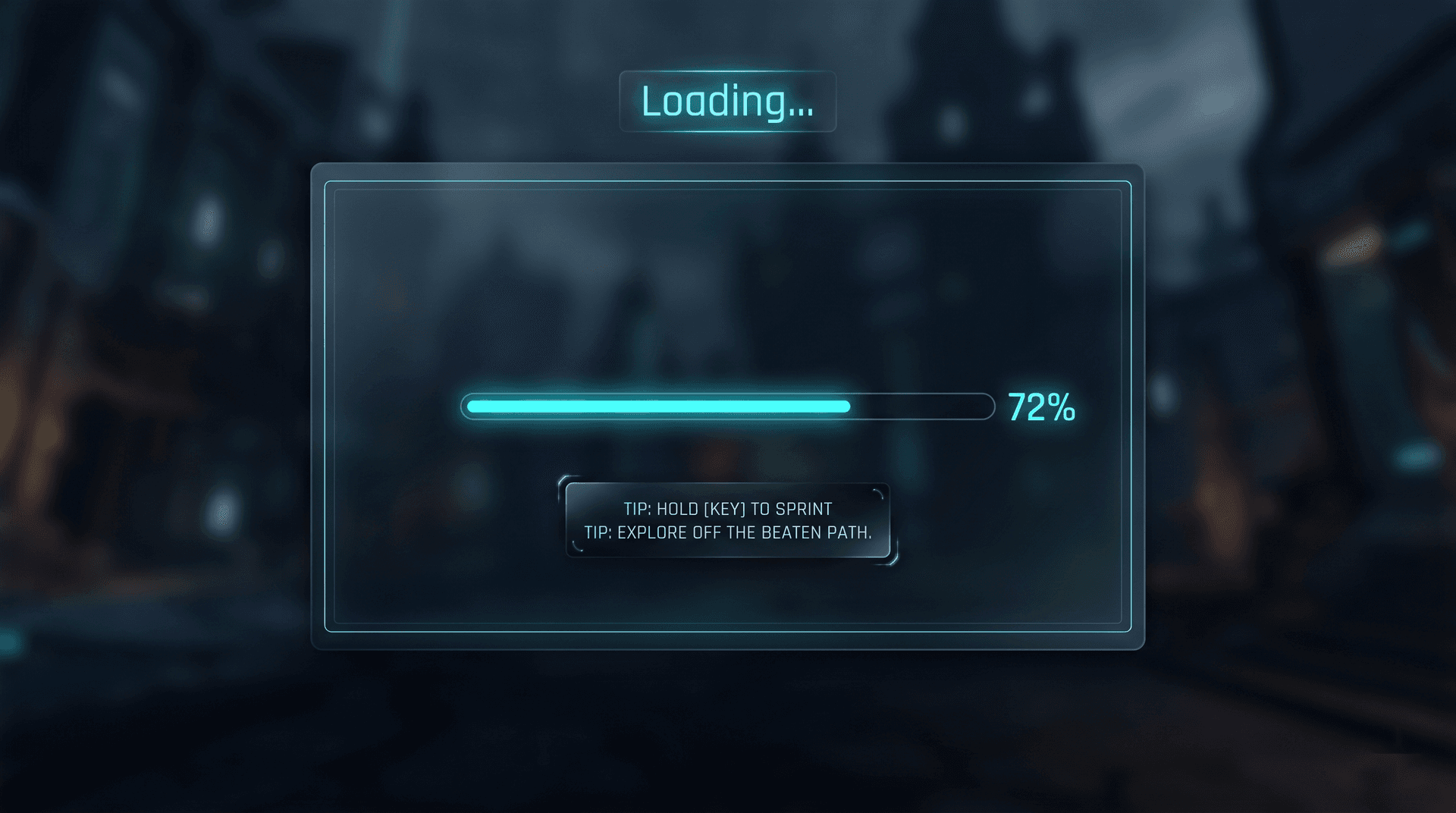
Live preview
Loading Screen
1920×1080Includes real, production-ready Luau logic — not a static mockup.
What's inside
- • Animated progress bar
- • Rotating gameplay tips
- • Fade-out on complete
- • Percent text label
- • Works with ContentProvider
How to use this template
The Loading Screen template shows a progress bar and rotating gameplay tips while the game loads. Paste the client Luau into StarterGui and the loading screen appears on join, fading out when loading completes. The progress bar fills based on ContentProvider:PreloadAsync, so it reflects real asset loading. The tips rotate every 4 seconds using a simple loop. The layout uses Scale-based sizing with a full-screen Frame, so it covers any device. To customize, replace the placeholder tips with your own gameplay hints. The fade-out uses TweenService on the Frame's Transparency. To wire it to your game, call the loading screen's hide function when your game is ready. Test in Studio by preloading a few large assets and confirming the progress bar fills.
Add it to your game in 3 steps
- 1
Copy the Luau
Open the template in the web editor and click Export. Choose LocalScript to copy the full client Luau to your clipboard.
- 2
Paste into StarterGui
In Roblox Studio, right-click StarterGui in the Explorer, insert a LocalScript, and paste the copied Luau. Rename it to match the template.
- 3
Press Play to verify
Click Play in Studio. The GUI should appear exactly as designed. Tweak any Size or Position values in the script if you want to adjust the layout.
1--[[2 Loading Screen - Client Side3 A loading screen with progress bar, rotating tips, and fade-out4 Features: Animated progress, gameplay tips, smooth transitions, asset tracking5]]67-- Services8local Players = game:GetService("Players")9local TweenService = game:GetService("TweenService")10local ReplicatedStorage = game:GetService("ReplicatedStorage")11local ContentProvider = game:GetService("ContentProvider")12local RunService = game:GetService("RunService")13local Lighting = game:GetService("Lighting")1415local player = Players.LocalPlayer16local playerGui = player:WaitForChild("PlayerGui")1718-- Constants19local PROGRESS_DURATION = 8 -- Minimum seconds to show loading screen20local TIP_ROTATION_INTERVAL = 4 -- Seconds between tips21local FADE_OUT_DURATION = 1.5 -- Fade out animation time22local PROGRESS_BAR_WIDTH = 40023local PROGRESS_BAR_HEIGHT = 122425-- Colors26local COLOR_BG = Color3.fromRGB(15, 15, 25)27local COLOR_BG_GRADIENT_TOP = Color3.fromRGB(20, 20, 40)28local COLOR_BG_GRADIENT_BOTTOM = Color3.fromRGB(10, 10, 20)29local COLOR_ACCENT = Color3.fromRGB(100, 180, 255)30local COLOR_ACCENT_GLOW = Color3.fromRGB(80, 140, 220)31local COLOR_TEXT_PRIMARY = Color3.fromRGB(255, 255, 255)32local COLOR_TEXT_SECONDARY = Color3.fromRGB(150, 160, 180)33local COLOR_TEXT_MUTED = Color3.fromRGB(80, 90, 110)34local COLOR_PROGRESS_BG = Color3.fromRGB(35, 38, 50)35local COLOR_PROGRESS_FILL = Color3.fromRGB(100, 180, 255)36local COLOR_TIP_HIGHLIGHT = Color3.fromRGB(255, 200, 80)3738-- Tween presets39local tweenInfoStandard = TweenInfo.new(0.3, Enum.EasingStyle.Quad, Enum.EasingDirection.Out)40local tweenInfoSmooth = TweenInfo.new(0.5, Enum.EasingStyle.Quad, Enum.EasingDirection.Out)41local tweenInfoFadeOut = TweenInfo.new(FADE_OUT_DURATION, Enum.EasingStyle.Quad, Enum.EasingDirection.Out)42local tweenInfoTipFade = TweenInfo.new(0.4, Enum.EasingStyle.Quad, Enum.EasingDirection.InOut)4344-- Gameplay Tips (rotate through these)45local GAMEPLAY_TIPS = {46 "Press 'E' to interact with objects around the world.",47 "Use the map (M key) to fast-travel to discovered locations.",48 "Complete daily quests for bonus rewards and XP.",49 "Team up with friends for harder challenges and better loot.",50 "Upgrade your equipment at the blacksmith regularly.",51 "Explore hidden areas to find rare collectibles.",52 "Join a guild to access exclusive events and rewards.",53 "Use potions wisely - they have a cooldown between uses.",54 "Check the leaderboard to see how you rank globally.",55 "Customize your character at the wardrobe station.",56 "Trade with other players at the marketplace.",57 "Save your game progress frequently at save points.",58}5960-- GUI References61local loadingGui, progressBarFill, progressText, progressStatus62local tipText, tipDots = {}, {}63local fadeOutOverlay, assetsLoadedLabel, timeElapsedLabel64local backgroundGradient6566-- State67local isLoadingComplete = false68local currentTipIndex = 169local loadingStartTime = 070local assetsToLoad = {}71local assetsLoaded = 07273-----------------------------------------------------------74-- Helper Functions75-----------------------------------------------------------7677local function Create(className, props)78 local instance = Instance.new(className)79 for key, value in pairs(props or {}) do80 instance[key] = value81 end82 return instance83end8485local function Tween(instance, properties, tweenInfoOverride)86 local info = tweenInfoOverride or tweenInfoStandard87 local tween = TweenService:Create(instance, info, properties)88 tween:Play()89 return tween90end9192-----------------------------------------------------------93-- UI Construction94-----------------------------------------------------------9596local function BuildUI()97 -- ScreenGui98 loadingGui = Create("ScreenGui", {99 Name = "LoadingScreenGui",100 ResetOnSpawn = false,101 ZIndexBehavior = Enum.ZIndexBehavior.Sibling,102 DisplayOrder = 999, -- On top of everything103 Parent = playerGui,104 })105106 -- Background Frame107 local bgFrame = Create("Frame", {108 Name = "BackgroundFrame",109 Size = UDim2.new(1, 0, 1, 0),110 BackgroundColor3 = COLOR_BG,111 BorderSizePixel = 0,112 ZIndex = 1000,113 Parent = loadingGui,114 })115116 backgroundGradient = Create("UIGradient", {117 Color = ColorSequence.new({118 ColorSequenceKeypoint.new(0, COLOR_BG_GRADIENT_TOP),119 ColorSequenceKeypoint.new(0.5, Color3.fromRGB(15, 15, 30)),120 ColorSequenceKeypoint.new(1, COLOR_BG_GRADIENT_BOTTOM),121 }),122 Rotation = 0,123 Parent = bgFrame,124 })125126 -- Subtle background pattern127 Create("ImageLabel", {128 Name = "BackgroundPattern",129 Size = UDim2.new(1, 0, 1, 0),130 BackgroundTransparency = 1,131 Image = "rbxassetid://6071575925", -- Dot grid pattern132 ImageColor3 = Color3.fromRGB(255, 255, 255),133 ImageTransparency = 0.95,134 ScaleType = Enum.ScaleType.Tile,135 TileSize = UDim2.new(0, 30, 0, 30),136 ZIndex = 1001,137 Parent = bgFrame,138 })139140 -- Logo Container141 local logoContainer = Create("Frame", {142 Name = "LogoContainer",143 Size = UDim2.new(0, 300, 0, 120),144 Position = UDim2.new(0.5, -150, 0.35, -60),145 AnchorPoint = Vector2.new(0.5, 0.5),146 BackgroundTransparency = 1,147 ZIndex = 1002,148 Parent = loadingGui,149 })150151 -- Game Logo (placeholder - replace with your game logo)152 Create("ImageLabel", {153 Name = "GameLogo",154 Size = UDim2.new(0, 80, 0, 80),155 Position = UDim2.new(0.5, -40, 0, 0),156 BackgroundTransparency = 1,157 Image = "rbxassetid://7072706316", -- Placeholder star icon158 ImageColor3 = COLOR_ACCENT,159 ZIndex = 1003,160 Parent = logoContainer,161 })162163 -- Game Title164 Create("TextLabel", {165 Name = "GameTitle",166 Size = UDim2.new(1, 0, 0, 36),167 Position = UDim2.new(0, 0, 0, 84),168 BackgroundTransparency = 1,169 Text = "YOUR GAME TITLE",170 TextColor3 = COLOR_TEXT_PRIMARY,171 TextSize = 28,172 Font = Enum.Font.GothamBlack,173 TextXAlignment = Enum.TextXAlignment.Center,174 ZIndex = 1003,175 Parent = logoContainer,176 })177178 -- Subtitle179 Create("TextLabel", {180 Name = "GameSubtitle",181 Size = UDim2.new(1, 0, 0, 20),182 Position = UDim2.new(0, 0, 0, 120),183 BackgroundTransparency = 1,184 Text = "Loading your adventure...",185 TextColor3 = COLOR_TEXT_SECONDARY,186 TextSize = 14,187 Font = Enum.Font.Gotham,188 TextXAlignment = Enum.TextXAlignment.Center,189 ZIndex = 1003,190 Parent = logoContainer,191 })192193 -- Progress Section194 local progressSection = Create("Frame", {195 Name = "ProgressSection",196 Size = UDim2.new(0, PROGRESS_BAR_WIDTH, 0, 80),197 Position = UDim2.new(0.5, -PROGRESS_BAR_WIDTH/2, 0.55, 0),198 AnchorPoint = Vector2.new(0.5, 0),199 BackgroundTransparency = 1,200 ZIndex = 1002,201 Parent = loadingGui,202 })203204 -- Progress Bar Background205 local progressBarBg = Create("Frame", {206 Name = "ProgressBarBackground",207 Size = UDim2.new(1, 0, 0, PROGRESS_BAR_HEIGHT),208 Position = UDim2.new(0, 0, 0, 0),209 BackgroundColor3 = COLOR_PROGRESS_BG,210 BorderSizePixel = 0,211 ZIndex = 1003,212 Parent = progressSection,213 })214215 Create("UICorner", {216 CornerRadius = UDim.new(0, PROGRESS_BAR_HEIGHT/2),217 Parent = progressBarBg,218 })219220 -- Progress Bar Fill221 progressBarFill = Create("Frame", {222 Name = "ProgressBarFill",223 Size = UDim2.new(0, 0, 1, 0),224 BackgroundColor3 = COLOR_PROGRESS_FILL,225 BorderSizePixel = 0,226 ZIndex = 1004,227 Parent = progressBarBg,228 })229230 Create("UICorner", {231 CornerRadius = UDim.new(0, PROGRESS_BAR_HEIGHT/2),232 Parent = progressBarFill,233 })234235 -- Gradient on fill236 Create("UIGradient", {237 Color = ColorSequence.new({238 ColorSequenceKeypoint.new(0, Color3.fromRGB(150, 210, 255)),239 ColorSequenceKeypoint.new(1, COLOR_PROGRESS_FILL),240 }),241 Rotation = 0,242 Parent = progressBarFill,243 })244245 -- Moving shine effect on progress bar246 local progressShine = Create("Frame", {247 Name = "ProgressBarShine",248 Size = UDim2.new(0, 60, 1, 0),249 Position = UDim2.new(0, -60, 0, 0),250 BackgroundColor3 = Color3.fromRGB(255, 255, 255),251 BackgroundTransparency = 0.7,252 BorderSizePixel = 0,253 ZIndex = 1005,254 Parent = progressBarFill,255 })256257 Create("UIGradient", {258 Color = ColorSequence.new({259 ColorSequenceKeypoint.new(0, Color3.fromRGB(255, 255, 255)),260 ColorSequenceKeypoint.new(0.5, Color3.fromRGB(255, 255, 255)),261 ColorSequenceKeypoint.new(1, Color3.fromRGB(255, 255, 255)),262 }),263 Transparency = NumberSequence.new({264 NumberSequenceKeypoint.new(0, 1),265 NumberSequenceKeypoint.new(0.5, 0),266 NumberSequenceKeypoint.new(1, 1),267 }),268 Parent = progressShine,269 })270271 -- Glow around progress bar272 Create("UIStroke", {273 Color = COLOR_ACCENT_GLOW,274 Thickness = 1,275 Transparency = 0.6,276 Parent = progressBarBg,277 })278279 -- Progress Text (percentage)280 progressText = Create("TextLabel", {281 Name = "ProgressText",282 Size = UDim2.new(0, 80, 0, 24),283 Position = UDim2.new(0, 0, 0, PROGRESS_BAR_HEIGHT + 8),284 BackgroundTransparency = 1,285 Text = "0%",286 TextColor3 = COLOR_ACCENT,287 TextSize = 16,288 Font = Enum.Font.GothamBold,289 TextXAlignment = Enum.TextXAlignment.Left,290 ZIndex = 1003,291 Parent = progressSection,292 })293294 -- Progress Status295 progressStatus = Create("TextLabel", {296 Name = "ProgressStatus",297 Size = UDim2.new(1, -90, 0, 24),298 Position = UDim2.new(0, 90, 0, PROGRESS_BAR_HEIGHT + 8),299 BackgroundTransparency = 1,300 Text = "Initializing...",301 TextColor3 = COLOR_TEXT_SECONDARY,302 TextSize = 13,303 Font = Enum.Font.Gotham,304 TextXAlignment = Enum.TextXAlignment.Right,305 TextTruncate = Enum.TextTruncate.AtEnd,306 ZIndex = 1003,307 Parent = progressSection,308 })309310 -- Tips Section311 local tipsSection = Create("Frame", {312 Name = "TipsSection",313 Size = UDim2.new(0, 500, 0, 80),314 Position = UDim2.new(0.5, -250, 0.7, 0),315 AnchorPoint = Vector2.new(0.5, 0),316 BackgroundTransparency = 1,317 ZIndex = 1002,318 Parent = loadingGui,319 })320321 -- Tip Icon322 Create("TextLabel", {323 Name = "TipIcon",324 Size = UDim2.new(0, 30, 0, 30),325 Position = UDim2.new(0, 0, 0, 0),326 BackgroundTransparency = 1,327 Text = "i",328 TextColor3 = COLOR_TIP_HIGHLIGHT,329 TextSize = 20,330 Font = Enum.Font.GothamBold,331 TextXAlignment = Enum.TextXAlignment.Center,332 ZIndex = 1003,333 Parent = tipsSection,334 })335336 -- Tip Label337 Create("TextLabel", {338 Name = "TipLabel",339 Size = UDim2.new(0, 80, 0, 20),340 Position = UDim2.new(0, 30, 0, 5),341 BackgroundTransparency = 1,342 Text = "DID YOU KNOW?",343 TextColor3 = COLOR_TIP_HIGHLIGHT,344 TextSize = 11,345 Font = Enum.Font.GothamBold,346 TextXAlignment = Enum.TextXAlignment.Left,347 ZIndex = 1003,348 Parent = tipsSection,349 })350351 -- Tip Text352 tipText = Create("TextLabel", {353 Name = "TipText",354 Size = UDim2.new(1, -30, 0, 40),355 Position = UDim2.new(0, 30, 0, 24),356 BackgroundTransparency = 1,357 Text = GAMEPLAY_TIPS[1],358 TextColor3 = COLOR_TEXT_SECONDARY,359 TextSize = 14,360 Font = Enum.Font.Gotham,361 TextXAlignment = Enum.TextXAlignment.Left,362 TextWrapped = true,363 ZIndex = 1003,364 Parent = tipsSection,365 })366367 -- Tip Indicator Dots368 local dotContainer = Create("Frame", {369 Name = "TipIndicatorContainer",370 Size = UDim2.new(1, 0, 0, 12),371 Position = UDim2.new(0, 0, 0, 68),372 BackgroundTransparency = 1,373 ZIndex = 1003,374 Parent = tipsSection,375 })376377 for i = 1, math.min(#GAMEPLAY_TIPS, 8) do378 local dot = Create("Frame", {379 Name = "TipDot_" .. i,380 Size = UDim2.new(0, 8, 0, 8),381 Position = UDim2.new(0.5, (i - 4.5) * 16 - 4, 0.5, -4),382 BackgroundColor3 = (i == 1) and COLOR_ACCENT or COLOR_TEXT_MUTED,383 BackgroundTransparency = (i == 1) and 0 or 0.5,384 BorderSizePixel = 0,385 ZIndex = 1004,386 Parent = dotContainer,387 })388 Create("UICorner", {389 CornerRadius = UDim.new(1, 0),390 Parent = dot,391 })392 tipDots[i] = dot393 end394395 -- Stats Section396 local statsSection = Create("Frame", {397 Name = "StatsSection",398 Size = UDim2.new(0, 400, 0, 30),399 Position = UDim2.new(0.5, -200, 0.88, 0),400 AnchorPoint = Vector2.new(0.5, 0),401 BackgroundTransparency = 1,402 ZIndex = 1002,403 Parent = loadingGui,404 })405406 assetsLoadedLabel = Create("TextLabel", {407 Name = "AssetsLoadedLabel",408 Size = UDim2.new(0.5, 0, 1, 0),409 Position = UDim2.new(0, 0, 0, 0),410 BackgroundTransparency = 1,411 Text = "Assets: 0/0",412 TextColor3 = COLOR_TEXT_MUTED,413 TextSize = 11,414 Font = Enum.Font.Gotham,415 TextXAlignment = Enum.TextXAlignment.Left,416 ZIndex = 1003,417 Parent = statsSection,418 })419420 timeElapsedLabel = Create("TextLabel", {421 Name = "TimeElapsedLabel",422 Size = UDim2.new(0.5, 0, 1, 0),423 Position = UDim2.new(0.5, 0, 0, 0),424 BackgroundTransparency = 1,425 Text = "Time: 0.0s",426 TextColor3 = COLOR_TEXT_MUTED,427 TextSize = 11,428 Font = Enum.Font.Gotham,429 TextXAlignment = Enum.TextXAlignment.Right,430 ZIndex = 1003,431 Parent = statsSection,432 })433434 -- Fade Out Overlay (used for fade-out transition)435 fadeOutOverlay = Create("Frame", {436 Name = "FadeOutOverlay",437 Size = UDim2.new(1, 0, 1, 0),438 Position = UDim2.new(0, 0, 0, 0),439 BackgroundColor3 = Color3.fromRGB(0, 0, 0),440 BackgroundTransparency = 1,441 BorderSizePixel = 0,442 ZIndex = 2000,443 Parent = loadingGui,444 })445446 -- Skip Button (for debugging, hidden by default)447 local skipButton = Create("TextButton", {448 Name = "SkipButton",449 Size = UDim2.new(0, 80, 0, 28),450 Position = UDim2.new(1, -100, 1, -40),451 BackgroundColor3 = COLOR_PROGRESS_BG,452 BackgroundTransparency = 0.5,453 Text = "Skip >>",454 TextColor3 = COLOR_TEXT_MUTED,455 TextSize = 11,456 Font = Enum.Font.Gotham,457 AutoButtonColor = false,458 Visible = false, -- Set true for debugging459 ZIndex = 1002,460 Parent = loadingGui,461 })462463 Create("UICorner", {464 CornerRadius = UDim.new(0, 6),465 Parent = skipButton,466 })467468 skipButton.MouseButton1Click:Connect(function()469 isLoadingComplete = true470 end)471end472473-----------------------------------------------------------474-- Progress Update475-----------------------------------------------------------476477local function SetProgress(percent, status)478 percent = math.clamp(percent, 0, 1)479480 -- Update progress bar fill481 Tween(progressBarFill, {482 Size = UDim2.new(percent, 0, 1, 0)483 }, tweenInfoStandard)484485 -- Update progress text486 progressText.Text = tostring(math.floor(percent * 100)) .. "%"487488 -- Update status489 if status then490 progressStatus.Text = status491 end492493 -- Animate shine effect across the fill494 local shine = progressBarFill:FindFirstChild("ProgressBarShine")495 if shine then496 Tween(shine, {497 Position = UDim2.new(1, -60, 0, 0)498 }, TweenInfo.new(0.6, Enum.EasingStyle.Quad, Enum.EasingDirection.Out))499 task.delay(0.3, function()500 shine.Position = UDim2.new(0, -60, 0, 0)501 end)502 end503504 -- Scale animation on percentage text for key milestones505 if percent == 0.25 or percent == 0.5 or percent == 0.75 or percent == 1 then506 Tween(progressText, {TextSize = 20}, tweenInfoSmooth)507 task.delay(0.2, function()508 Tween(progressText, {TextSize = 16}, tweenInfoSmooth)509 end)510 end511end512513-----------------------------------------------------------514-- Tip Rotation515-----------------------------------------------------------516517local function RotateTip()518 -- Fade out current tip519 Tween(tipText, {TextTransparency = 1}, tweenInfoTipFade)520521 task.delay(0.4, function()522 -- Update tip index523 currentTipIndex = currentTipIndex + 1524 if currentTipIndex > #GAMEPLAY_TIPS then525 currentTipIndex = 1526 end527528 -- Update text529 tipText.Text = GAMEPLAY_TIPS[currentTipIndex]530531 -- Fade in new tip532 Tween(tipText, {TextTransparency = 0}, tweenInfoTipFade)533 end)534535 -- Update dot indicators536 for i, dot in pairs(tipDots) do537 if i == currentTipIndex then538 Tween(dot, {539 BackgroundColor3 = COLOR_ACCENT,540 BackgroundTransparency = 0,541 Size = UDim2.new(0, 10, 0, 10),542 Position = UDim2.new(0.5, (i - 4.5) * 16 - 5, 0.5, -5),543 })544 else545 Tween(dot, {546 BackgroundColor3 = COLOR_TEXT_MUTED,547 BackgroundTransparency = 0.5,548 Size = UDim2.new(0, 8, 0, 8),549 Position = UDim2.new(0.5, (i - 4.5) * 16 - 4, 0.5, -4),550 })551 end552 end553end554555local tipRotationConnection = nil556557local function StartTipRotation()558 if tipRotationConnection then559 tipRotationConnection:Disconnect()560 end561562 local accumulator = 0563 tipRotationConnection = RunService.Heartbeat:Connect(function(dt)564 accumulator = accumulator + dt565 if accumulator >= TIP_ROTATION_INTERVAL then566 accumulator = 0567 RotateTip()568 end569 end)570end571572local function StopTipRotation()573 if tipRotationConnection then574 tipRotationConnection:Disconnect()575 tipRotationConnection = nil576 end577end578579-----------------------------------------------------------580-- Asset Preloading581-----------------------------------------------------------582583-- Collect important assets to preload584local function CollectAssets()585 local assets = {}586587 -- Add all image/decal IDs from ReplicatedStorage588 for _, obj in ipairs(ReplicatedStorage:GetDescendants()) do589 if obj:IsA("ImageLabel") or obj:IsA("ImageButton") then590 if obj.Image ~= "" and obj.Image:find("rbxassetid://") then591 table.insert(assets, obj.Image)592 end593 end594 if obj:IsA("Sound") and obj.SoundId ~= "" then595 table.insert(assets, obj.SoundId)596 end597 end598599 -- Add Lighting assets600 for _, child in ipairs(Lighting:GetChildren()) do601 if child:IsA("Sky") then602 for _, prop in ipairs({"SkyboxUp", "SkyboxDn", "SkyboxLf", "SkyboxRt", "SkyboxFt", "SkyboxBk"}) do603 local id = child[prop]604 if id and id ~= "" then605 table.insert(assets, id)606 end607 end608 end609 end610611 return assets612end613614local function PreloadAssets(assets)615 assetsToLoad = assets616 local totalAssets = #assets617618 if totalAssets == 0 then619 return -- Nothing to preload620 end621622 -- Preload in batches623 local batchSize = 10624 for i = 1, totalAssets, batchSize do625 local batch = {}626 for j = i, math.min(i + batchSize - 1, totalAssets) do627 table.insert(batch, assets[j])628 end629630 ContentProvider:PreloadAsync(batch, function(assetId, assetFetchStatus)631 assetsLoaded = assetsLoaded + 1632 local progress = assetsLoaded / totalAssets633634 -- Update status635 local status = string.format("Loading asset %d/%d...", assetsLoaded, totalAssets)636 SetProgress(progress, status)637638 -- Update stats639 assetsLoadedLabel.Text = string.format("Assets: %d/%d", assetsLoaded, totalAssets)640 end)641 end642end643644-----------------------------------------------------------645-- Background Animation646-----------------------------------------------------------647648local gradientConnection = nil649650local function StartBackgroundAnimation()651 if gradientConnection then652 gradientConnection:Disconnect()653 end654655 local rotation = 0656 gradientConnection = RunService.Heartbeat:Connect(function(dt)657 rotation = rotation + dt * 2658 if rotation > 360 then659 rotation = rotation - 360660 end661 if backgroundGradient then662 backgroundGradient.Rotation = math.sin(rotation * 0.1) * 15663 end664 end)665end666667local function StopBackgroundAnimation()668 if gradientConnection then669 gradientConnection:Disconnect()670 gradientConnection = nil671 end672end673674-----------------------------------------------------------675-- Loading Sequence676-----------------------------------------------------------677678local function RunLoadingSequence()679 loadingStartTime = tick()680681 -- Phase 1: Initializing (0% - 20%)682 SetProgress(0, "Initializing...")683 task.wait(0.5)684685 -- Phase 2: Collect and preload assets (20% - 80%)686 SetProgress(0.2, "Scanning assets...")687 task.wait(0.3)688689 local assets = CollectAssets()690691 if #assets > 0 then692 SetProgress(0.25, string.format("Preloading %d assets...", #assets))693 PreloadAssets(assets)694 else695 -- Simulate loading if no assets to preload696 for i = 1, 10 do697 task.wait(PROGRESS_DURATION / 20)698 SetProgress(0.25 + (i / 10) * 0.55, "Loading game data...")699 assetsLoadedLabel.Text = string.format("Assets: %d/0", i)700 end701 end702703 -- Ensure minimum display time704 local elapsed = tick() - loadingStartTime705 local remaining = PROGRESS_DURATION - elapsed706707 if remaining > 0 then708 -- Phase 3: Finalizing (80% - 100%)709 SetProgress(0.8, "Finalizing...")710711 -- Gradually fill to 100%712 local steps = 20713 for i = 1, steps do714 task.wait(remaining / steps)715 local progress = 0.8 + (i / steps) * 0.2716 SetProgress(progress, i < steps and "Finalizing..." or "Ready!")717718 -- Update elapsed time719 timeElapsedLabel.Text = string.format("Time: %.1fs", tick() - loadingStartTime)720 end721 end722723 SetProgress(1, "Ready!")724 task.wait(0.5)725726 isLoadingComplete = true727end728729-----------------------------------------------------------730-- Fade Out and Cleanup731-----------------------------------------------------------732733local function FadeOutAndCleanup()734 -- Stop animations735 StopTipRotation()736 StopBackgroundAnimation()737738 -- Fade out overlay739 fadeOutOverlay.BackgroundTransparency = 0740741 -- Fade out entire loading screen742 Tween(fadeOutOverlay, {BackgroundTransparency = 1}, tweenInfoFadeOut)743744 -- Also fade all children745 for _, child in ipairs(loadingGui:GetDescendants()) do746 if child:IsA("GuiObject") and child ~= fadeOutOverlay then747 local targetTransparency = 1748 if child:IsA("TextLabel") or child:IsA("TextButton") then749 Tween(child, {TextTransparency = targetTransparency}, tweenInfoFadeOut)750 elseif child:IsA("ImageLabel") or child:IsA("ImageButton") then751 Tween(child, {ImageTransparency = targetTransparency}, tweenInfoFadeOut)752 end753 if child.BackgroundTransparency < 1 then754 Tween(child, {BackgroundTransparency = targetTransparency}, tweenInfoFadeOut)755 end756 end757 end758759 -- Wait for fade then destroy760 task.delay(FADE_OUT_DURATION, function()761 if loadingGui and loadingGui.Parent then762 loadingGui:Destroy()763 end764 end)765end766767-----------------------------------------------------------768-- Wait for game to be ready769-----------------------------------------------------------770771local function WaitForGameReady()772 -- Wait for essential services773 local servicesReady = false774 local attempts = 0775776 repeat777 attempts = attempts + 1778 local success = pcall(function()779 -- Check if workspace is loaded780 local _ = workspace:WaitForChild("Terrain", 2)781 -- Check if player character data is available782 local _ = player:WaitForChild("PlayerGui", 2)783 end)784 servicesReady = success785 if not servicesReady then786 task.wait(0.1)787 end788 until servicesReady or attempts > 50789790 return servicesReady791end792793-----------------------------------------------------------794-- Initialization795-----------------------------------------------------------796797local function Initialize()798 BuildUI()799 StartBackgroundAnimation()800 StartTipRotation()801802 -- Wait for game to be ready803 WaitForGameReady()804805 -- Run loading sequence in background806 task.spawn(function()807 RunLoadingSequence()808 end)809810 -- Wait for loading to complete811 task.spawn(function()812 while not isLoadingComplete do813 task.wait(0.1)814 -- Update elapsed time815 if timeElapsedLabel and timeElapsedLabel.Parent then816 timeElapsedLabel.Text = string.format("Time: %.1fs", tick() - loadingStartTime)817 end818 end819820 -- Fade out821 FadeOutAndCleanup()822 end)823824 print("[LoadingScreen] Loading screen initialized.")825end826827Initialize()